



TL;DR:
- These 5 n8n workflows save Shopify store owners 40+ hours per month and cost exactly $0 to run on n8n’s self-hosted Community Edition (versus $240 to $828/year on Zapier for the same automations).
- Each workflow includes the exact node configuration so you can build it step by step. No coding background required, though comfort with APIs helps.
- Quick Answer: Start with Workflow #5 (Daily Sales Report to Telegram). It takes 15 minutes to build, uses only 4 nodes, and gives you an instant win that proves the value of automation before tackling the more complex flows.
Table of Contents
You opened your Shopify store to sell products, not to spend 10 hours a week copying order data into spreadsheets, manually sending follow-up emails, and checking inventory counts. Yet that’s exactly what most store owners do because they think automation requires either expensive tools or a developer on staff.
Neither is true. N8n Shopify automation workflows can handle the most time-consuming parts of running your store for exactly $0 on the self-hosted Community Edition. The n8n open-source self-hosted version is free to use indefinitely with unlimited workflows and executions. No task limits. No feature restrictions. Just pure automation power.
At BK Web Designs, we’ve built and deployed these exact workflows for over 50 Shopify stores through our workflow automation service. What follows isn’t theory. These are 5 production-ready workflows we use every week, with the node-by-node configuration explained so you can build them yourself.
📥 Free Resource: Running a Shopify store? Make sure your foundation is solid before automating. Download our free 15-Point Shopify Launch Checklist to verify your store is set up for success.
Download Free Checklist →

Why n8n Over Zapier for Shopify Automation
Let’s address this directly. Zapier is the tool most people know. It’s easy, well-documented, and connects to everything. But for Shopify store owners running multiple automation workflows, it gets expensive fast.
Zapier’s Professional plan starts at $19.99/month (billed annually) for 750 tasks. Each action step in a workflow counts as a separate task, meaning a 5-step automation running once consumes 5 tasks. A moderately active Shopify store running our 5 workflows would burn through 750 tasks in under two weeks. Upgrading to the Team plan costs $69/month for 2,000 tasks, and even that can be tight for busy stores.
N8n’s self-hosted Community Edition? Completely free. Unlimited workflows. Unlimited executions. Your only cost is the server it runs on, typically $5 to $20/month for a basic VPS on DigitalOcean or Hetzner. And critically, n8n counts an entire workflow run as one execution, regardless of how many steps it contains. A 10-step workflow running 1,000 times equals 1,000 n8n executions but 10,000 Zapier tasks.
| Feature | n8n (Self-Hosted) | Zapier | Shopify Flow |
|---|---|---|---|
| Monthly Cost | $0 (software) + $5 to $20 (hosting) | $19.99 to $69/month | Free (with Shopify plan) |
| Task/Execution Limits | Unlimited | 750 to 2,000/month | Unlimited |
| Workflow Complexity | Advanced (code nodes, API calls, branching) | Medium (pre-built connectors) | Basic (Shopify ecosystem only) |
| Works Outside Shopify | Yes (any API, any service) | Yes (8,000+ apps) | No (Shopify only) |
| Self-Hosted Option | Yes (your data, your server) | No (cloud only) | No |
| Custom Code | Yes (full JavaScript) | Limited | No |
| Learning Curve | Medium to High | Low | Very Low |
| Best For | Technical founders, agencies, power users | Non-technical users wanting quick setup | Simple Shopify-only automations |
When Zapier still makes sense: If you’re non-technical, only need 2 to 3 simple automations, and your store processes under 50 orders per month, Zapier’s ease-of-use justifies the cost. For everyone else, n8n delivers the same (or better) results at a fraction of the price.

What You Need Before Starting
Before building any workflow, get these three things set up:
- n8n installed. Self-host on a $5/month VPS using Docker (the cheapest option for a basic VPS is a $4 to $5/month Hetzner server with Docker Compose), or use n8n Cloud starting at $24/month if you prefer managed hosting.
- Shopify API access. In your Shopify Admin, go to Settings, then Apps, then Develop Apps, then Create App. Enable the API scopes you need (read_orders, read_products, read_customers at minimum). Save your API access token.
- Basic trigger-action understanding. Every workflow has a trigger (something that starts it, like a new order) and actions (things that happen in response, like sending an email). N8n’s visual editor makes this logic visible as connected nodes. If you can read a flowchart, you can build a workflow.
Workflow #1: Abandoned Cart Recovery Sequence (Saves 5+ Hours/Month)
The business case: The average cart abandonment rate is 70.22% according to Baymard Institute. The best-performing recovery programs recapture 15 to 30% of abandoned carts through well-structured three-email sequences. For a store with 200 abandoned carts per month at $75 average cart value, recovering even 10% means $1,500/month in recaptured revenue, automatically.
The Workflow Logic
Customer creates a checkout but doesn’t complete it. After 1 hour, the system checks if the order was completed. If not, it sends the first reminder email. After 24 hours, a second email with social proof. After 48 more hours, a final email with a small incentive like free shipping or 10% off.
The n8n Node Configuration
- Webhook Node: Receives Shopify’s “checkout/create” webhook. Configure this URL in Shopify Admin under Notifications, then Webhooks.
- Wait Node: Set to 1 hour delay.
- HTTP Request Node: Query Shopify’s Orders API to check if the checkout converted to an order. Use the checkout token to match.
- IF Node: If order exists, stop the workflow. If no order, proceed to email sequence.
- Gmail/Brevo Node: Send Email 1 (friendly reminder with cart contents). Use the checkout data from the webhook to populate product names and images.
- Wait Node: 24-hour delay, then send Email 2. Another Wait Node for 48 hours, then Email 3 with discount code.
- Google Sheets Node: Log every abandoned cart and recovery attempt for tracking your recovery rate.
We built this exact workflow for a Shopify store doing $40K/month. Within 60 days, the sequence recovered $4,200 in sales that would have been lost, running entirely on autopilot.
Workflow #2: Order Confirmation + Review Request Sequence (Saves 3+ Hours/Month)
The business case: Automated post-purchase email sequences generate significantly more reviews than manual requests. More reviews mean higher conversion rates on your product pages (270% higher for products with 5+ reviews, per the Spiegel Research Center). This workflow automates the entire post-purchase journey.
The n8n Node Configuration
- Webhook Node: Receives Shopify’s “orders/create” webhook.
- Gmail Node: Immediately sends a branded order confirmation with expected delivery date and a “What to expect” section.
- Wait Node: 3-day delay.
- Gmail Node: Sends a “How to get the most from your purchase” email with product tips, care instructions, or usage ideas.
- Wait Node: 4-day delay (7 days post-purchase total).
- Gmail Node: Sends a review request email with a direct link to your review platform (Judge.me, Loox, or native Shopify reviews).
- Google Sheets Node: Logs customer name, email, product purchased, and review request status.
This workflow is one of the simplest to build and has an outsized impact. One client went from receiving 3 to 4 reviews per month (from manual requests they’d forget to send) to 25+ reviews per month once this automation went live.
Workflow #3: Low Stock Alert + Supplier Notification (Saves 2+ Hours/Month)
The business case: Running out of your best-selling product costs you every sale that product would have generated until it’s restocked. This workflow eliminates manual inventory checking by alerting you the moment stock drops below your threshold.
The n8n Node Configuration
- Schedule Trigger Node: Runs daily at 8:00 AM.
- HTTP Request Node: Calls Shopify’s Products API (GET /admin/api/2024-01/products.json) to pull inventory levels for all active products.
- IF Node: Filters products where inventory_quantity is below your threshold (we typically set this to 10 units).
- Telegram Node: Sends you an alert message: “Low stock alert: [Product Name] has only [X] units left. Current sell rate: [Y] per week. Estimated stockout in [Z] days.” Alternatively, use Slack if that’s your team’s tool.
- Gmail Node (optional): Automatically emails your supplier with a reorder template including product SKU, suggested reorder quantity, and your preferred delivery timeline.
Workflow #4: New Customer Welcome + CRM Segmentation (Saves 3+ Hours/Month)
The business case: First-time customers are your most fragile relationship. A personalized welcome email within minutes of their first purchase sets the tone for repeat buying. Segmenting them by what they bought enables targeted marketing later.
The n8n Node Configuration
- Webhook Node: Receives Shopify’s “customers/create” webhook.
- HTTP Request Node: Query Shopify’s Orders API to check if this customer has more than one order. If it’s their first, proceed.
- IF Node: First-time customer? If yes, continue. If returning customer, route to a different flow (or stop).
- Gmail Node: Send a personalized welcome email. Include your brand story, what makes you different, and a “what to expect” section. Optionally include a small incentive for their second purchase.
- Set Node: Categorize the customer by what they purchased (product type, price tier, collection). This creates structured data for your CRM.
- Google Sheets Node: Add the customer to your Google Sheets CRM with columns for name, email, first purchase date, product category, and order value. This becomes your segmented customer database.
If you’re also running an AI chatbot on your store, you can extend this workflow to feed customer purchase data into your chatbot’s knowledge base, enabling personalized support based on what each customer actually bought. Our guide on adding an AI chatbot to your site covers the chatbot side of this integration.
Workflow #5: Daily Sales Report to Telegram (Saves 30+ Hours/Month)
The business case: Most store owners start their day by opening Shopify, scrolling through orders, mentally calculating totals, and trying to spot trends. This workflow delivers a formatted summary to your phone at 9 AM every morning. You start every day informed without touching the dashboard.
The n8n Node Configuration
- Schedule Trigger Node: Fires daily at 9:00 AM in your timezone.
- HTTP Request Node: Calls Shopify’s Orders API with a date filter for the previous 24 hours (created_at_min and created_at_max parameters).
- Code Node (JavaScript): Calculates total revenue, order count, average order value, and identifies the top-selling product by quantity. This is 15 to 20 lines of simple JavaScript that sums values from the API response.
- Telegram Node: Sends a formatted message to your Telegram chat or group. Example output: “Daily Report for March 18: 23 orders totaling $2,847. AOV: $123.78. Top seller: Organic Face Serum (9 units). Compared to yesterday: +12% revenue.”
This is the workflow we recommend starting with. It’s the simplest (4 nodes, 15 minutes to build), gives you an instant daily win, and proves the power of n8n before you invest time in the more complex flows. If you’ve been checking your Shopify dashboard obsessively trying to understand your numbers, this workflow replaces that habit with a passive morning briefing.

All 5 Workflows at a Glance
| Workflow | Time Saved/Month | Revenue Impact | Setup Difficulty | n8n Nodes |
|---|---|---|---|---|
| Abandoned Cart Recovery | 5+ hours | Recover 10 to 15% of lost sales | Medium | 7 nodes |
| Order Thank You Sequence | 3+ hours | 3x more product reviews | Easy | 7 nodes |
| Low Stock Alerts | 2+ hours | Zero stockouts on bestsellers | Medium | 5 nodes |
| Customer Welcome Flow | 3+ hours | Higher repeat purchase rate | Easy | 6 nodes |
| Daily Sales Report | 30+ hours | Better daily decision-making | Easy | 4 nodes |
| TOTAL | 43+ hours/month |
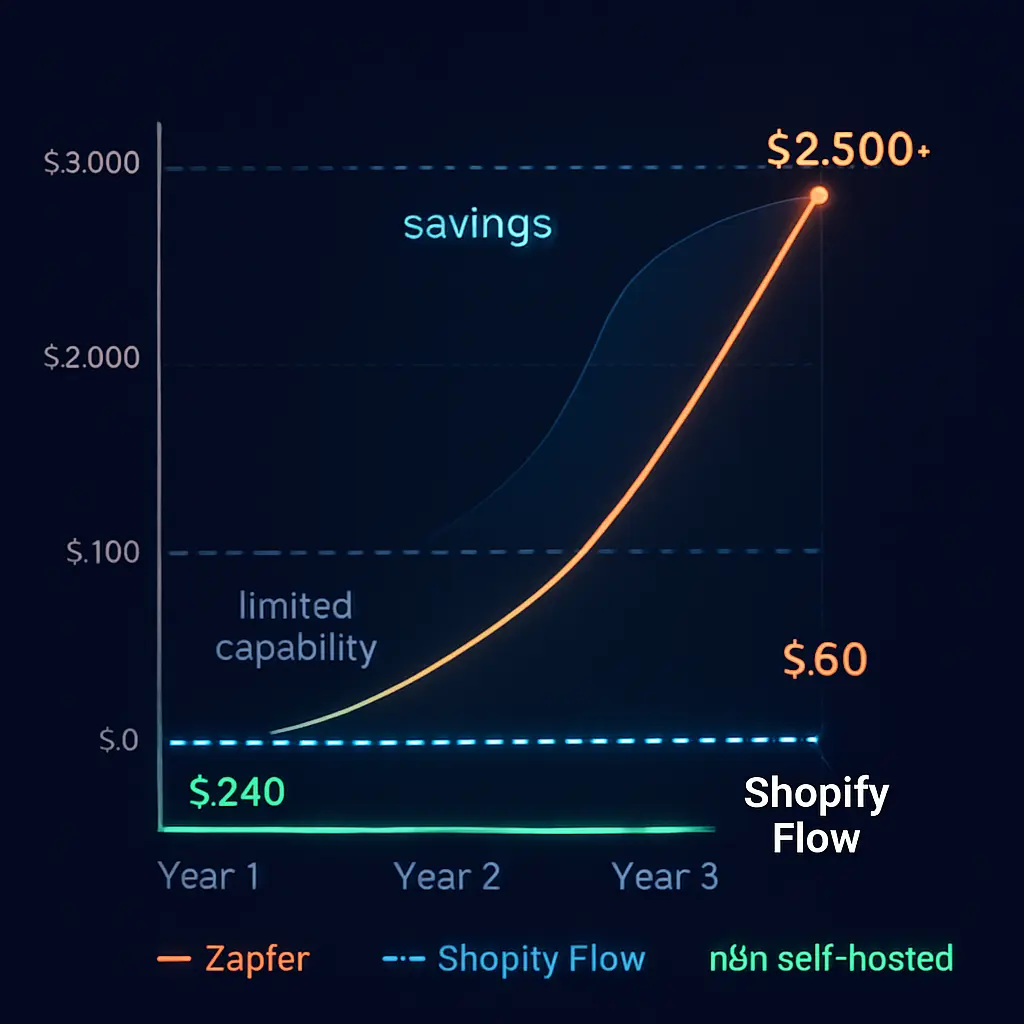
The Annual Cost Comparison (Running All 5 Workflows)
| Platform | Monthly Cost | Annual Cost | Execution/Task Limits |
|---|---|---|---|
| n8n Self-Hosted | $5 to $20 (hosting only) | $60 to $240 | Unlimited |
| n8n Cloud (Starter) | $24 (€24) | $288 | 2,500 executions/month |
| Zapier Professional | $19.99 | $239.88 | 750 tasks/month (will need upgrade) |
| Zapier Team | $69 | $828 | 2,000 tasks/month |
Over 3 years, a Shopify store running these 5 workflows on n8n self-hosted saves $1,800 to $2,300 compared to Zapier Team. That’s money that goes back into your ad budget, inventory, or product development.
How to Get Started (3 Paths)
Path A: Full DIY (Free)
Install n8n on a $5/month VPS, follow the workflow configurations in this guide, and build each automation yourself. Start with Workflow #5 (Daily Sales Report) since it’s the simplest. Budget 2 to 4 hours total to get all 5 workflows live. Best for: technical founders comfortable with APIs and Docker.
Path B: Use n8n Cloud ($24/Month)
If you don’t want to manage a server, n8n Cloud handles the hosting for you. You still build the workflows yourself using the same node configurations above, but skip the server setup. The Starter plan at $24/month includes 2,500 executions, which is plenty for most stores under 500 orders per month. Best for: founders who want automation without DevOps.
Path C: Hire Us to Build Everything
If your time is more valuable than the setup cost, our Workflow Automation packages start at $2,000. We build all 5 workflows configured to your specific store, deploy them on your server or our managed infrastructure, and provide 30 days of monitoring and support. Most clients save 20+ hours per month from day one. Best for: busy store owners who want results without the learning curve.
Frequently Asked Questions
Q: Is n8n really free for Shopify automation?
A: Yes. The n8n Community Edition is completely free to self-host with unlimited workflows and executions under the Sustainable Use License. You pay only for the server it runs on, typically $5 to $20/month for a basic VPS. N8n Cloud (managed hosting) starts at $24/month with 2,500 executions. The self-hosted version has zero feature restrictions compared to paid tiers.
Q: Do I need coding skills to set up n8n workflows?
A: Not for most workflows. N8n uses a visual drag-and-drop editor where you connect nodes. Workflows 2, 4, and 5 require no code. Workflow 1 (cart recovery) and Workflow 3 (stock alerts) use HTTP Request nodes that require basic API understanding but no actual programming. Workflow 5’s Code node uses simple JavaScript for calculations, but we provide the exact code you can copy and paste.
Q: Can n8n replace Zapier completely for my Shopify store?
A: For most Shopify automation needs, yes. N8n connects to any service with an API, handles complex multi-step logic, and supports custom JavaScript code. The main trade-off is the learning curve. Zapier is simpler to set up initially, but n8n is far more powerful and cost-effective at scale. Real-world reports from agencies show 70 to 90% cost savings when switching from Zapier to self-hosted n8n for high-volume use cases.
Q: How do I install n8n on my own server?
A: The simplest approach is a $5/month VPS (DigitalOcean or Hetzner) with Docker installed. You run a single Docker Compose command and n8n is live within minutes. N8n’s official documentation provides step-by-step instructions. For production use, add a PostgreSQL database for data persistence and set up SSL using Let’s Encrypt. Budget 30 to 60 minutes for the initial setup.
Q: Will these automations work with WooCommerce too?
A: Yes, with modifications. WooCommerce uses the WordPress REST API instead of Shopify’s API, so the HTTP Request nodes need different endpoints and authentication. The business logic (cart recovery timing, email sequences, stock thresholds) stays identical. If you run a Shopify store or WooCommerce site, n8n connects to both. We build automations for both platforms regularly.
Q: What happens if an n8n workflow breaks or stops working?
A: N8n includes built-in error handling. You can configure “Error Trigger” nodes that alert you via email or Telegram when any workflow fails. For self-hosted instances, set up a monitoring tool like Uptime Kuma (free) to watch your n8n server’s health. Common issues include expired API tokens (re-authenticate in Shopify) and webhook URL changes (update in Shopify Settings). Most issues resolve in under 5 minutes.
🚀 Need Professional Help?
Want these workflows built and maintained for you? Our Workflow Automation packages start at $2,000 and include custom n8n workflow design, deployment on your server, and 30 days of support. Most clients save 20+ hours per month from day one.